What Is Tiling and What Role Does Caldera PrimeCenter Play?
June 09, 2026
You are now an expert in large format printing, and you know practically all the obstacles that printers might encounter in this large printing journey. In one single production, there has to be one or two constraints related to graphics and their dimensions.
Sometimes, it’s just impossible to print large pictures on one sheet of paper because they are too big for that. For example, you want a picture to cover a whole wall, a shop window, or even the outside of a building. Well, this is not possible if you try to make it fit in one sheet.
To print a picture that big, you need to first split it into smaller pieces that can be printed separately. Then, you will have to make these pieces fit together perfectly. Each piece has its own place, as if you’re reassembling a puzzle but in a quicker, automated way. Next, all edges will be lined up to get the final picture.
Tiling in PrimeCenter is built for this. It automatically cuts a large design into the right-sized panels for printing. Each panel is carefully planned so that, when printed and put together, they create one large, perfect image, even for the biggest projects.
Why Use Tiling?
Its ability to solve these challenges makes tiling ideal for:
- Murals: Large printed graphics applied to walls for decoration or branding.
- Window coverings: Printed or tinted films used on glass for privacy, light control, or advertising.
- Building wraps: Large-scale graphics that cover building exteriors, often for promotion or construction masking.
- Retail graphics: Visual prints in stores designed to attract customers and highlight products.
- Exhibition displays: Portable visual setups used at events or trade shows to showcase brands or products.
- Large-format signs: Oversized signs created for high visibility from a distance.
- Facade coverings: Exterior building graphics used to enhance appearance or display branding.
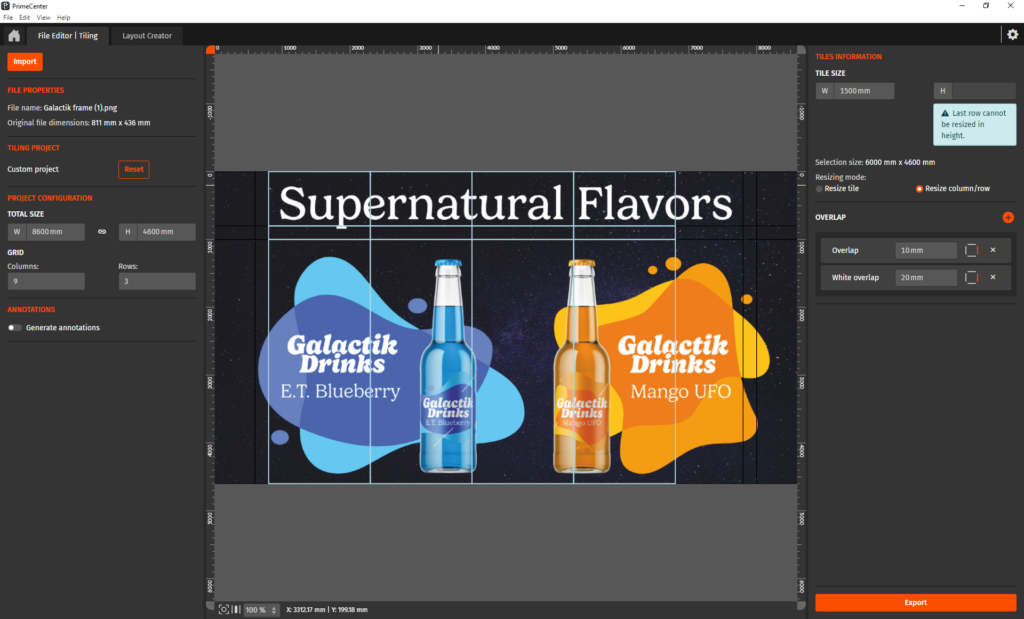
By dividing a big project into carefully planned pieces, Tiling helps you:
- Print large graphics on standard-sized materials
- Make installation simpler and more accurate
- Add overlaps so no unwanted gaps appear
- Automatically label each tile for installers
- Create guides that show exactly how everything fits together
In short, tiling turns even the largest designs into a collection of easy-to-manage pieces, ready to come together as one impressive final image.
More Than Just Splitting a Picture in Pieces
Now, once you start with Tiling, it might seem to you as a simple procedure: cut one large image into smaller pieces. But the efforts in tiling stretch far beyond that.
You will need to have the right size for all images to fit together. Caldera helps you put every piece in the right place without wasting significant time on guessing and configurations.
PrimeCenter carefully plans each tile so it matches your printer, your materials, and the way the graphic will be installed. Every panel is created with precision, helping avoid mistakes and saving valuable time.
PrimeCenter can also add small overlaps between tiles, allowing neighboring panels to gently cover each other’s edges. This helps the final image look smooth and complete, with no unwanted gaps or visible seams.
To make installation even easier, each tile can be automatically labeled, like pages in a book or pieces of a treasure map. Clear guides show installers where every panel belongs, making it simple to assemble even the largest graphics.
The result is a process that feels less like solving a difficult puzzle and more like watching a big picture come together exactly as planned.
Faster Production, Easier Installation
Large format projects often involve multiple teams: from prepress operators and print providers to installers working on site.
Tiling creates a clear structure that helps work more efficiently.
With organized panel layouts, automatic annotations, assembly guidance, and production-ready exports, teams will spend less time solving logistical challenges and will focus more on production.
Precision is Finally Part of your Work
Available in PrimeCenter since version 3.2, the Tiling feature gives print professionals the tools they need to handle oversized graphics with confidence and precision. Designed to simplify the production of large-format applications, it combines intelligent panel generation, overlap management, annotation support, cut-contour compatibility, and assembly documentation into a single, efficient workflow.
These capabilities help reduce manual preparation, minimize the risk of errors, and ensure consistent results from production through installation.
Whether you’re producing a retail campaign, a striking wall mural, a trade show display, or a full building wrap, PrimeCenter makes it easy to divide complex designs into accurately aligned panels that can be printed, finished, and assembled with confidence. By simplifying even the most demanding projects and providing clear guidance throughout the process, PrimeCenter ensures that every piece fits perfectly, allowing the final installation to appear exactly as intended: one seamless, impactful image that captures attention and delivers maximum visual impact.
Automatic Contour Handling for Tiled Jobs
Complex contour-based designs have traditionally created additional challenges in tiling workflows, especially when contour data could not be preserved throughout the process.
With PrimeCenter 4.7, contour data stored in the contour dictionary is automatically detected and maintained within the Tiling studio. During export, contours are intelligently closed on each tile, ensuring every panel is immediately ready for cutting, even for complex non-rectangular shapes.
Tiling functionality is also available in CalderaRIP, providing additional flexibility within the production workflow.
This automation reduces manual preparation, minimizes production errors, and increases flexibility for sophisticated large-format applications.
Interested in PrimeCenter and CalderaRIP?
Contact us to learn more about PrimeCenter and the Tiling+ feature in CalderaRIP. You can also schedule a demo to see the tiling module in action.
Related articles