Voom Group Streamlines Large-Format Production with PrimeCenter
September 02, 2026
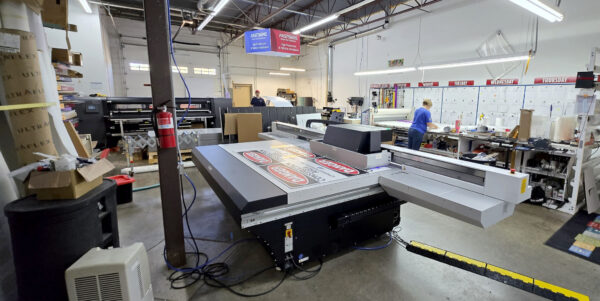
Voom Group is a customer-focused print partner providing digital, offset, large-format, promotional, mailing, fulfillment, and print-management services. Its large-format department produces signs, banners, panels, displays, name badges, acrylic pieces, and other customized applications for businesses of all sizes.
To support this work, Voom operates:
- Two HP roll-to-roll printers
- One large-format UV flatbed printer
- An ONYX RIP workflow
- PrimeCenter for prepress and job preparation
The challenge: Too much manual job preparation
Before adopting PrimeCenter, Voom relied on another workflow solution for tasks such as nesting, imposition, and preparing jobs with registration marks. However, the team wanted a more intuitive and efficient way to prepare production files.
Manual preparation created several challenges:
- Repeating the same setup tasks for recurring jobs
- Determining the right layout for different materials and finishing requirements
- Optimizing material usage
- Preparing files individually before sending them to the RIP
- Spending time recreating settings that could be standardized
For Christian Hernandez, who works in Voom’s large-format department, the goal was to make production preparation simpler and more consistent.
We were looking for something easier and more user-friendly for nesting, imposition, and getting the best material consumption. PrimeCenter makes that much easier for us.
The solution: Standardized recipes and hot folders
Voom implemented PrimeCenter alongside its existing ONYX RIP workflow. The team uses PrimeCenter for its everyday job preparation, including:
- Nesting and imposition
- Registration marks
- Cut guidelines
- Grommets and other finishing requirements
- File preparation for different materials
- Routing jobs to the RIP
For recurring work, Voom creates recipes based on the material and finishing requirements. These recipes are connected to hot folders, allowing operators to drop files into the appropriate folder and have the required preparation applied automatically.
This approach gives the team a more organized way to manage production. Instead of setting up every file from scratch, operators can choose the workflow that matches the job and its finishing requirements.
If we have something we do every day, I create a folder with the settings we need, such as imposition, guidelines, or grommets. Then I can just drop the file into the hot folder, and it makes my life easier.
The results: Faster preparation and more efficient material use
With PrimeCenter, Voom has reduced the time spent organizing and preparing files. A recurring job can now be processed by dropping it into the appropriate hot folder and sending the resulting file to the RIP.
According to Christian, this typically takes approximately two minutes for the preparation step, depending on the job.
The team has also improved how it manages material-specific production requirements. Recipes help Voom determine in advance whether a job requires a particular cut type, shape, or finishing setup.
Key benefits
- Less manual file preparation
- Faster handling of recurring jobs
- More consistent production setup
- Better organization by material and finishing requirement
- Improved material utilization
- Easier preparation for complex or customized jobs
- Flexible workflows for both automated and one-off production
It takes much less time to organize everything. We figure out what we need once, create the recipe, and then use it again. That saves us time each time a similar job comes in.
A workflow that supports customized print production
Voom’s business is built around providing solutions that do not force customers into standardized templates. Its large-format department regularly handles a wide variety of signs, banners, panels, displays, and specialty applications.
PrimeCenter helps the team maintain that flexibility while introducing repeatability into the production process. Standard jobs can be processed through recipes and hot folders, while unusual or one-off jobs can still be prepared manually when needed.
This combination allows Voom to handle customized work without adding unnecessary complexity to its production workflow.
Even when there is only one sign, I usually bring the files into PrimeCenter. I use it for everything.
Responsive support when needed
Voom also relies on customer support when questions or technical issues arise. Christian describes the support team as friendly and helpful, including during an early software reinstallation when existing recipes needed to be recovered and restored. “When I need to contact support, they are very friendly and help me with any issues.”
Looking ahead
Voom continues to use PrimeCenter as a central part of its large-format production preparation. The team also benefits from ongoing software updates and new capabilities that can be evaluated as its production needs evolve.
By combining PrimeCenter recipes, hot folders, and its existing ONYX RIP workflow, Voom has created a more efficient and organized approach to large-format job preparation, helping the team save time, reduce repetitive work, and use materials more effectively.
At a glance
| Challenge | Solution | Outcome |
|---|---|---|
| Manual, repetitive job preparation | PrimeCenter recipes and hot folders | Faster preparation of recurring work |
| Different material and finishing requirements | Material-specific workflows | More consistent production setup |
| Time spent optimizing layouts | Nesting and imposition in PrimeCenter | Better material utilization |
| Mix of recurring and customized jobs | Automated and manual workflows | Greater flexibility for daily production |
Related articles