Repetition is Becoming a Thing of the Past: Meet Tool Presets in Caldera PrimeCenter 5.2
September 21, 2026
Let’s talk about repetition despite the fact that it has been one of the prominent topics on our blog so far. And by repetition, we don’t mean repeating smooth steps through production. We mean the other kind of repetition: you open the same tool, enter the same settings, check the same boxes, and make the same adjustments, and finally doing it all-over again multiple times. And this repetition occurs only a few hours after you’ve validated your first tool setup.
If you work in large format printing industry or prepress, you are already familiar with these struggles. A file arrives on your computer. You start checking it. And suddenly, you detect some aspects that need fixing. You know exactly which tools you need, and more importantly, you probably already know which settings you want to use. But of course, you have to go through the whole process of setting everything up. And you have to do this every single time. With Tool Presets in Caldera PrimeCenter, that repetitive part can now start becoming a thing of the past.
You already know what works. Why set it up again?
The people working with files every day can build up a lot of practical knowledge.
You know which settings work for a particular type of file. You know the corrections you regularly need to make. You know the tools you reach for when a specific problem appears.
Tool Presets let you save that knowledge in a reusable configuration.
Instead of recreating your preferred setup every time, you can save it and bring it back whenever you need it. It’s a simple idea, but one that can make a real difference during a busy production day.

Your files can still be completely different from one another. Your operators can still inspect every incoming file. And you still make the final decision about what needs to happen. All in all, you still have full control over manual checking. PrimeCenter 5.2 allows you to reduce the repetitive setup because you simply don’t need it in your workflow.
Your control stays exactly where it belongs
Automation can sometimes sound like a big step, especially to someone who uses it partially or not at all. You might hear “automation” and immediately think about processes running without anyone checking what is happening. So, you imagine that the result will be unsupervised. But Tool Presets don’t make you lose control over your files and the process of fixing them. You remain in control of everything your files require.
You can still check files individually and your operators can still decide which tools and settings are appropriate for each job. If something appears weird or unusual, they can deal with it exactly as they normally would. The difference here is that when you already know the right configuration, you don’t have to configure everything from scratch.
You can think of Tool Presets as automation without giving up the human decision-making that matters. So basically, the operator decides and makes the call while PrimeCenter quickly executes.
You save the setup, not just the time
We all know that more than once a day, you get a file that needs the same preparation. And you have figured out the settings through experience.
Maybe you have tested them, adjusted them, and finally ended up with the configuration that gives you the result you want. Without using presets or saving the settings, that knowledge will stay on someone’s head.
And this is not the most ideal thing to do in an industry that treats thousands of files.
What happens when another operator handles the job? What happens six months later when you haven’t used that configuration for a while? Or when someone must recreate it under pressure?

A saved preset gives you something much more reliable to work from. You will have a configuration that’s ready to reuse. This means that you’re not just saving time, you are also making useful production knowledge easier to share or access when you or your operator are not present.
Faster preparation when the pressure is on
Nobody needs reminding that time matters in print. It matters more than anything else. Your production schedule gets busy quickly and files arrive at different times. Customers ask for changes and deadlines are always close. A production schedule gets busy quickly. Files arrive at different times. Customers want changes. Deadlines move closer. When the pressure is on, the last thing your operators need is unnecessary setup work.
With Tool Presets, configurations you use regularly are immediately available. Instead of starting with an empty tool and working through the settings, you can start with a configuration you’ve already established. That can turn a familiar multi-step setup into something much more straightforward. And those saved minutes don’t disappear. Multiply a few minutes across dozens of files, operators and production days, and repetitive preparation can become a surprisingly significant part of your workload.
Consistency matters, especially when teams grow
There’s another benefit that becomes increasingly important as your production operation grows: consistency. When several people are preparing files, everyone naturally develops their own habits.
One operator remembers a particular setting. Another uses a slightly different value. Someone else has their own preferred workflow. Sometimes those differences don’t matter. And sometimes they do.
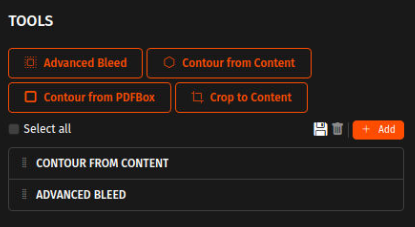
Tool Presets give your team a common starting point for repeatable tasks. If you’ve established a configuration that works for a particular type of preparation, you can save it and make that configuration available for reuse. It doesn’t eliminate operator judgment. Instead, it gives operators a proven foundation to work from. That’s particularly useful when you’re training new team members or trying to make processes more consistent across shifts.
Fewer clicks. Fewer chances to get something wrong.
Repetitive tasks are tremendously time consuming. And they also attract small mistakes and errors. When you’ve entered the same information dozens of times, it’s easy to miss a setting or type something incorrectly and this happens particularly when you’re moving quickly.
Tool Presets in PrimeCenter 5.2 reduce the amount of repetitive manual configuration involved in your workflow. The fewer times you have to re-enter the same information, the fewer opportunities there are for those small mistakes.
Of course, operators still review the files and decide what needs to happen. But the routine setup can be handled by a configuration you’ve already saved and checked.
Let your operators focus on the files
This is perhaps one of the biggest benefits. You operators are valuable to your prinshop because they understand print, and not because they are good at clicking through menus.
When they look at a file, they can immediately recognize when something does not look right. They understand production requirements. And more importantly, they can make decisions when a job doesn’t fit the usual pattern.
These are the skills you want them to invest time on. Tool Presets helps them take some of the repetitive preparation off their plate, giving them more time for the work that requires their experience and attention. Their time will be spent solving other problems rather than configuring what was already configured.
A gentle way into standardization
If you’ve been thinking about standardizing your file-preparation processes, Tool Presets can also provide a comfortable place to start because it is a small step that doesn’t automate it all. You don’t have to rework or rebuild your whole workflow in one week. You can simply start by one task.
You can detect something that your team does repeatedly, establish the configuration you want to use, save it as a preset and then see how it works in everyday production. Once you see that your team is starting to get comfortable with that approach, you can think of more approaches from there and how to build your workflow.
Over time, you can create a collection of trusted configurations for the tasks you encounter most often. It’s a more gradual approach to process standardization, one that lets you improve your workflow without turning your production floor upside down.
For small and mid-sized print businesses: keep it simple
If you’re running a small or mid-sized print business, your production probably doesn’t look like a factory producing the exact same job thousands of times.
You get to see something different everyday in print production and that’s particularly why Tool Presets can be useful. You don’t need every job to be identical to benefit from repeatable processes.
Maybe you regularly receive a particular kind of customer file. Maybe certain file problems appear again and again. Maybe there are tools your team uses constantly with a familiar set of configurations.
Those repeatable elements can be standardized, while the rest of the job remains completely flexible. You get the best of both worlds: individual attention for every file, with less repetitive preparation behind the scenes.
For larger production teams: test before you automate
For larger production environments, there’s another interesting possibility. Maybe you’re looking at automated recipes but don’t want to introduce a new workflow before you’ve had a chance to test it properly. Tool Presets give you somewhere to experiment without changing anything in your workflow.
You can create a configuration, use it on real-world files and see how it performs. Your operators can work with it, identify exceptions and refine the process.
Once you’ve established a workflow that works reliably, you have a stronger foundation for taking the next step toward automation.
In that sense, Tool Presets can act as a bridge between manual production and automated production. You don’t have to make the leap all at once. You can build your workflow, test it, learn from it and standardize it, at your own pace.
Repetition is predictable. Production isn’t.
And that’s really the point. Print production will always involve unexpected files, last-minute changes and jobs that don’t quite behave the way you expected. You need people who can recognize those situations and respond to them.
But you don’t need those same people repeatedly entering the same settings they’ve already entered hundreds of times.
Tool Presets in Caldera PrimeCenter help separate the two. The unpredictable parts stay in the hands of your operators. The repetitive parts can be saved, reused and made ready for the next job.
So the next time a familiar file issue appears, you don’t have to think, “How did I configure this last time?”
You can simply reach for the preset and get on with printing.
Related articles